
2D TRANSFORMS
Documentation:
https://www.w3schools.com/css/css3_2dtransforms.asp
TRANSLATE
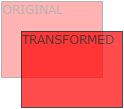
The translate()
method moves an element from its current position (according to the parameters given for the X-axis and the Y-axis).
The following example moves the element 50 pixels to the right, and 100 pixels down from its current position:
ROTATE
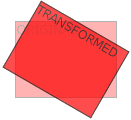
The rotate()
method rotates an element clockwise or counter-clockwise according to a given degree.
The following example rotates the element clockwise with 20 degrees:
Using negative values will rotate the element counter-clockwise.
The following example rotates the element counter-clockwise with 20 degrees:
SCALE
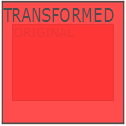
The scale()
method increases or decreases the size of an element (according to the parameters given for the width and height).
The following example increases the element to be two times of its original width, and three times of its original height:
The following example decreases the element to be half of its original width and height:
SKEW
The skew()
method skews an element along the X and Y-axis by the given angles.
The following example skews the element 20 degrees along the X-axis, and 10 degrees along the Y-axis:
If the second parameter is not specified, it has a zero value. So, the following example skews the element 20 degrees along the X-axis:
TRANSFORM PROPERTIES
- transform
- Applies a 2D or 3D transformation to an element
- transform-origin
- Allows you to change the position on transformed elements
